Several tills in one Store
Availability
Several tills in one Store: available since Gestix 7.2.01. Related licence features: Point of Sales, Multi Store Pack.
Store and workstation on POS tickets in the back office: available since Gestix 7.2.04. Related licence features: Point of Sales, Multi Store Pack.
Features vary with the edition and configuration you subscribe to: check your licence for the features it includes. Why can't I see a feature?
A Store can have several POS workstations, one for each till, up to the limit of your licence. This page is for administrators who set the tills up. How cashiers work at the tills is in the POS Quick User Guide.
See the workstations of each Store
Open Admin › POS Workstation. The list shows each workstation with its Store and description.
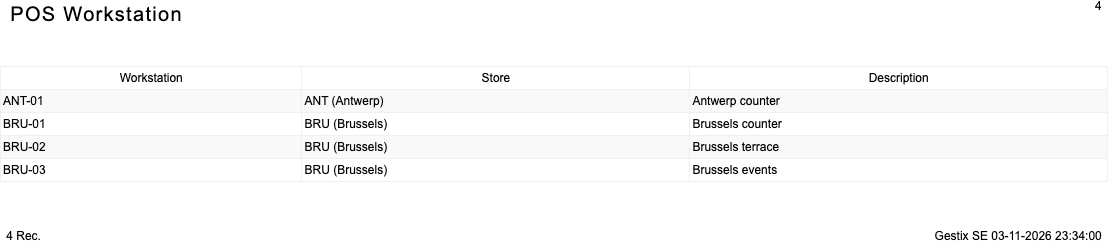
Brussels has three tills: BRU-01 counter, BRU-02 terrace and BRU-03 events. Antwerp has one.
Add a workstation
- In Admin › POS Workstation, select New. Gestix proposes the first Store that still has room, and the next workstation id of that Store, for example ANT-02.
- Choose the Store, type the Workstation id and the Description, then select Save.
- Bind the till's browser to the new workstation: sign in there as an administrator, open POS and select the workstation under "Bind this device to a POS workstation". See Binding a browser to a workstation.
If the Store already has as many workstations as your licence allows, Gestix refuses the new one and creates nothing:
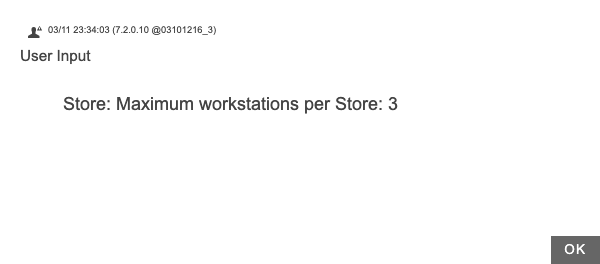
The number is your licence's limit of workstations per Store.
How the tills of a Store work together
- Series: every till of a Store uses the Store's POS series. A ticket paid at BRU-02 is numbered in BRUPOS, like one paid at BRU-01, and each ticket gets the next number of the series.
- Operators: an operator whose profile allows the Store can work at any of its tills. Store access is set in the privilege profile, under Store access.
- Drafts: a ticket saved as a draft at one till can be finished at another till of the same Store. The Drafts list shows the till where each draft was saved.
- Which till: at a till, the operator window shows "Store: BRU Brussels - POS Workstation: BRU-02".
Related
Which till issued a ticket
From Gestix 7.2.04, the back-office view of a POS ticket shows the Store and the workstation that issued it, below the QR code, for example "Store: BRU Brussels | Workstation: BRU-01 Brussels counter". Its print view shows the same line. The A4 PDF does not. Tickets issued before Gestix 7.2, and documents finished outside the POS, show no line.