Rebuilding articles marked out of date
Availability
Rebuilding articles marked out of date.
Warning sign on out-of-date articles: available since Gestix 7.2.01.
Features vary with the edition and configuration you subscribe to: check your licence for the features it includes. Why can't I see a feature?
Gestix marks an article out of date when its stock and weighted average cost could not be updated exactly. Until the article is rebuilt, its average cost is approximate. This page is for administrators and support.
When Gestix marks an article
- A document dated in the past was posted after later movements of the article.
- A processed document was voided, deleted or edited.
A document dated today is not checked, so it does not mark the article. Nothing rebuilds marked articles automatically.
Find the marked articles
- In Articles, set Filter to Out of date - stock rebuild pending to list them.
- The Articles widget of the dashboard shows how many articles are out of date.
The warning sign on the article
While an article is out of date, its page shows an orange warning sign after the Stock and after the Weighted Average Cost. Every user sees the sign after the Stock; the one after the cost appears only to users who may see costs.
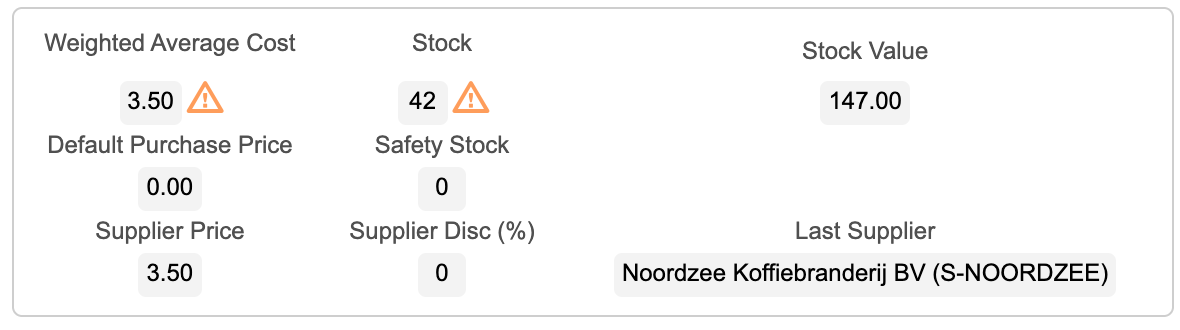
Hover over the sign to read why, or tap or click it to open the explanation: "Stock and weighted average cost may be out of date. Movements were entered with an earlier date or reversed after they were calculated." Administrators then read "Use Check on the article to rebuild it."; other users read "Ask an administrator to run Check."
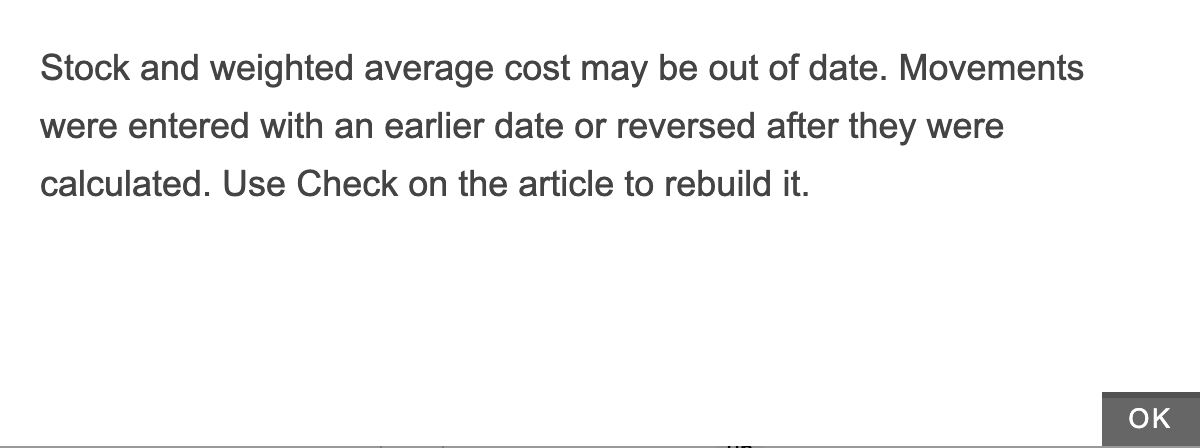
The sign goes away when Check rebuilds the article.
Rebuild one article: Check
Administrators can rebuild a single marked article from its page:
- Open the article. While it is out of date, its toolbar shows Check (only to administrators).
- Select Check. Gestix rebuilds the article in the background and says: "Consistency checking in progress: article. Refresh the page in a few seconds to see the result".
- Refresh the page. When the rebuild has ended, it says "The article was rebuilt: article (date and time)", and Check is no longer shown.


If the rebuild fails, the article shows administrators the reason and stays marked. If there is no result after two minutes, it says "The check gave no result": the background job did not run on the server; ask Gestix Technical Support.
Rebuild many articles on the server
The rebuild of many articles is a command run on the Gestix server. If you do not administer the server, ask Gestix Technical Support.
| Command | What it does |
|---|---|
gnet-cmd.exe <database> stock-check-outofdate <user> [article] |
Dry run of the rebuild: changes nothing |
gnet-cmd.exe <database> stock-update-outofdate <user> [article] |
Rebuilds the marked articles and clears their mark |
gnet-cmd.exe <database> stock-update <user> |
Rebuilds every article and also refreshes the annual inventory used by the inventory reports |
<database>is the full database name of the company.<user>is the code of an administrator user.[article]is optional and limits the run to matching articles.
When to run it:
- after maintenance, such as data imports or corrections of past documents;
- on a schedule, for example nightly, at a quiet time. No schedule is configured by default.
While it runs
Gestix is read-only for every user while a rebuild runs, and becomes writable again when it ends. Users do not need to sign out.
What can change
- The average cost of the rebuilt articles, and the cost recorded on their past sales, returns and stock exits.
- No document, document number or quantity changes.
If a rebuild was interrupted
A rebuild that is stopped before it ends leaves Gestix read-only. To recover:
- Check that no rebuild is still running.
- Clear the parameter
stock_check_runningin the tablesys_paramsof the company's database. - Run the command again.