Serial and batch numbers in reports
Availability
Serial and batch numbers in reports: available since Gestix 7.1.01. Related licence features: Serial Numbers, Batch Numbers.
Serial numbers in Customer RMA counted as on hand: available since Gestix 7.2.04. Related licence features: Serial Numbers. Settings: usr_sn_customer_rma_on_hand.
Features vary with the edition and configuration you subscribe to: check your licence for the features it includes. Why can't I see a feature?
Gestix has always had serial and batch numbers, with reports of their own. Since Gestix 7.1.01, two general Articles reports can also show which serial or batch number each line moved: the Sales Listing and Movement of Goods. Use them to answer questions such as "who bought serial BCE-GRD-0001?" or "where did lot L-BULK-2609A go?".
Show the numbers
- Open Articles and choose the report: Sales Listing or Movement of Goods. For the Sales Listing, leave Summary unticked: the numbers appear only in the detailed listing.
- Set Product Traceability to Serial Number or Batch Number.
- Set the other criteria as usual, for example the Transactions dates, and choose Go.
A column named after your choice appears:
- in the Sales Listing, after Entity;
- in Movement of Goods, after Document.
The Purchases Listing shows it too.
What the column shows
- Serial numbers: the serial numbers of the line, separated by commas.
- Batch numbers: each batch of the line with its quantity in brackets.
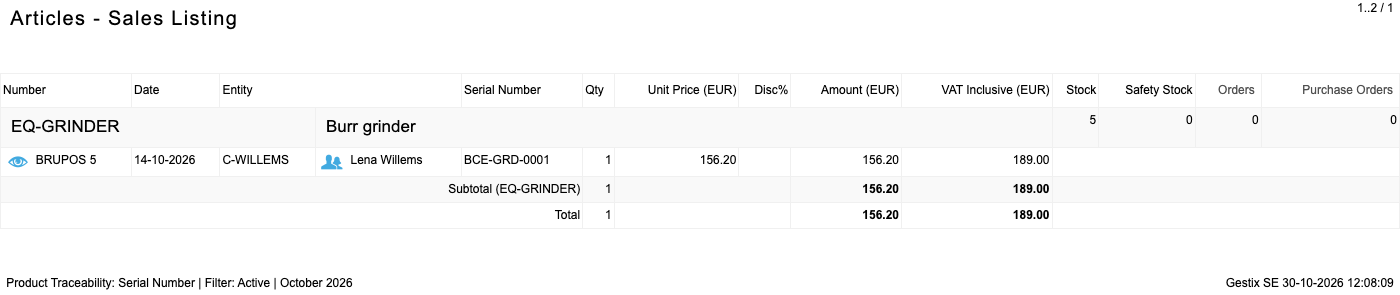
Sales Listing, Product Traceability "Serial Number": the burr grinder sold on BRUPOS 5 carried serial BCE-GRD-0001.
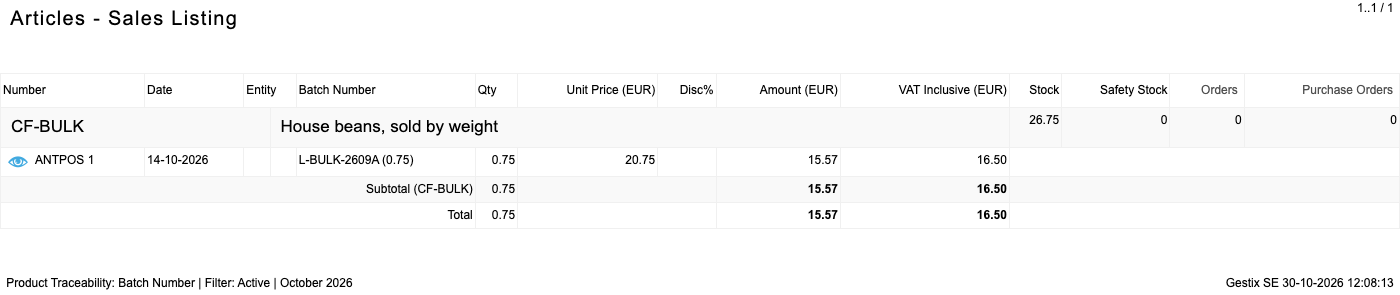
Sales Listing, Product Traceability "Batch Number": 0.75 kg of house beans sold on ANTPOS 1 came from lot L-BULK-2609A.
In Movement of Goods, the column follows each number through purchases, transfers and sales:
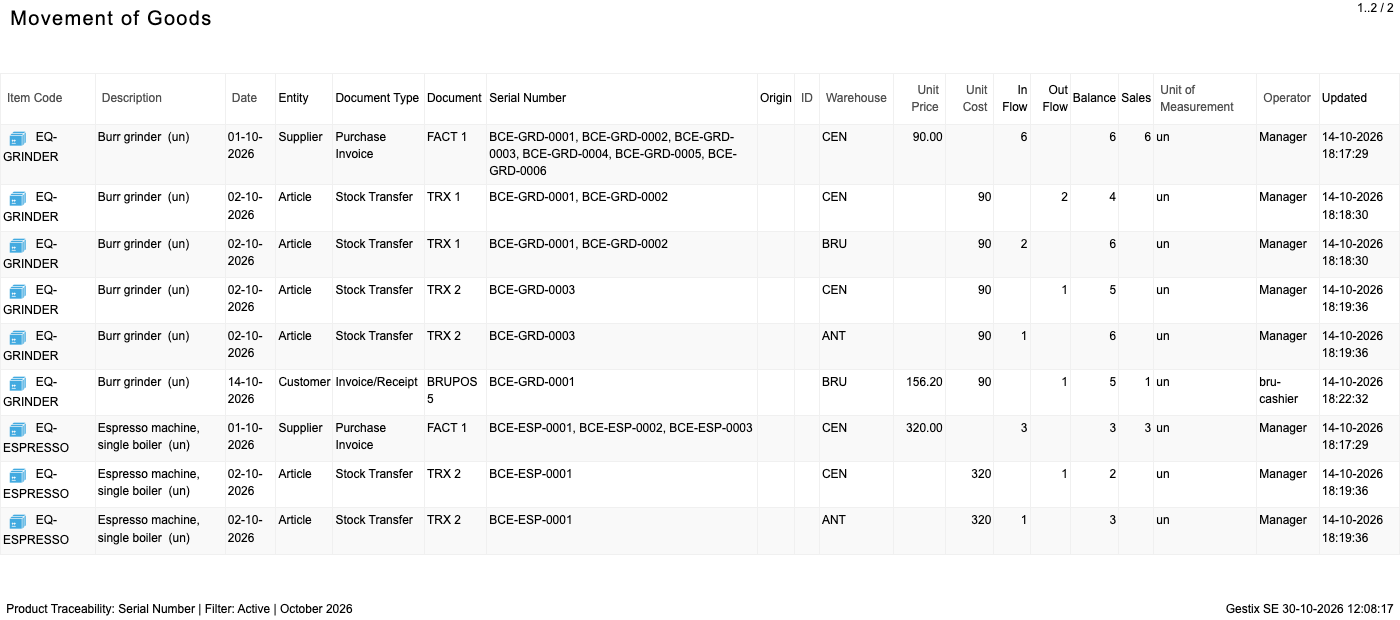
Movement of Goods, Product Traceability "Serial Number": six grinders received on FACT 1 into CEN, BCE-GRD-0001 and -0002 transferred to BRU on TRX 1, BCE-GRD-0003 to ANT on TRX 2, and BCE-GRD-0001 sold at BRU on BRUPOS 5.
A transfer appears twice, once for each warehouse: as an exit (Out Flow) of the warehouse it leaves and as an entry (In Flow) of the warehouse it enters.
Excel and CSV
- Excel/CSV: the serial or batch column is the last column of the file.
- Export/CSV of Movement of Goods, the format used for importing, does not include it.
Without Product Traceability
With Product Traceability set to (All), the reports are as they were before: no serial or batch column.
Serial numbers returned by a customer
A serial number returned on a credit/return memo has the status Customer RMA. From Gestix 7.2.04, the parameter usr_sn_customer_rma_on_hand (Admin › Parameters) decides whether such a serial number counts as on hand in Product Traceability "On Hand" and in Inventory by Store:
- 1: it counts as on hand and is listed with its status, "Customer RMA";
- 0: it does not count, as before Gestix 7.2.04;
- empty (the default): as 1, unless the Licensing Business module is active, where it is as 0.
The serial number's status, the documents and the REST API are not changed by the parameter.
Related
- To list only the exits or only the entries, for example the serial numbers that left one warehouse, combine this with the Movements criterion of Movement of Goods (Gestix 7.1.02).