Approving customer orders by salesperson limits
Availability
Related licence features: Sales Order Approval.
Features vary with the edition and configuration you subscribe to: check your licence for the features it includes. Why can't I see a feature?
A customer quote above a salesperson's sales limit can be held until a manager approves it. Each salesperson has a sales limit and a superior. When a document exceeds the limit, it goes to the first superior whose own limit covers the amount, and it cannot be printed, sent, delivered or invoiced until that person approves it.
This page is for administrators who set up the limits, for the sales staff whose documents are held, and for the managers who approve them. Purchases are approved the same way with the purchase limit: see Approving purchases by salesperson limits.
How it works
- Customer Quotes, Cost Estimates and Proformas are held.
- The limit that counts is the one of the document's salesperson (the Salesperson field of the document), not that of the user who records it.
- The amount compared is the document's total amount. A document whose total is equal to or above the salesperson's limit needs approval; below the limit it is ready to use at once.
- A held document goes to the salesperson's superior (Sales Manager). If the superior's own sales limit is not above the amount either, it goes on up the chain to the first superior whose limit is above the amount, or who has no limit.
- A limit of 0 means no limit: that salesperson's documents are never held, and as a superior that person can approve any amount.
- If no one up the chain can approve the amount, the document is saved and held with no approver, and Gestix shows "No one left to approve this order".
Example. Elise Wouters has a sales limit of €5,000 and reports to Pieter Claes (limit €10,000), who reports to Anne Dubois (no limit). A quote of €6,490.00 for Elise goes to Pieter. One of €12,980.00 for Pieter goes to Anne.
Set up the salespersons
- Open Accounts › Salespersons and create or open each salesperson. Choose Modify to change an existing one.
- For each person who approves other people's documents, tick May Approve. Only these salespersons can be chosen as a superior.
- In Sales Manager, choose the salesperson's superior. Leave it empty for the top of the chain.
- Under Sales Order Approval, enter the Plafond: the amount from which this salesperson's quotes need approval. Enter 0 for no limit.
- Select Save.

Elise Wouters (EWO): Sales Manager Pieter, sales Plafond €5,000.00.
Then link each user to their salesperson: under Admin... › Users, open the user, choose Modify and select the Salesperson. An approver sees the documents waiting for them only when their user is linked to their salesperson.
When a document is held
Save the quote as usual. If it needs approval, its Approval Status shows "Pending Approval" and the name of the person who must approve it:
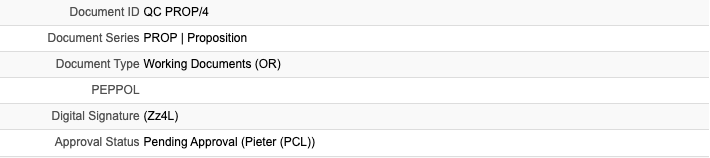
PROP 4 (€6,490.00, salesperson Elise): Pending Approval (Pieter (PCL)).
While the document is held, its toolbar has no actions to print, send, deliver or invoice it:

Held: Home, Back, New, Void and UBL only.
On a held quote, the Task panel proposes the CRM task type Sales Approval for a note about the approval.
Approve a document
- Open Orders and choose To Approve in the menu at the top. The list shows the documents waiting for your approval, by salesperson, with their lines, totals and the Superior who must approve them.
- In Approval Status, choose Authorized. The other choices are Revision and Cancel. You can add a comment in the box beside it.
- Select Update.

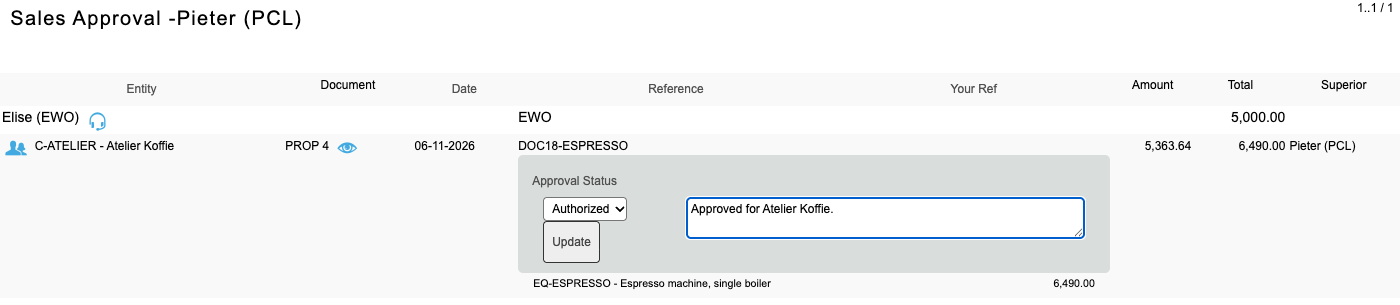
Pieter's list: PROP 4 of salesperson Elise (limit 5,000.00), DOC18-ESPRESSO, total 6,490.00, Superior Pieter.
The same list is the Sales Approval report of Salespersons.
Once authorised, the document shows "Approved by" and the approver's name, and its toolbar has every action again:

PROP 4 approved by Pieter (PCL): Close, Invoice, Order, Cash Sale, Send Mail, Print and PDF are back.
Follow your held documents
To see which of your quotes are waiting for a superior, open Orders and choose Waiting Approval in the menu at the top. The list shows each held document and its Superior, the person who must approve it. It is read-only: you cannot change the approval there. A document leaves the list once it is approved.
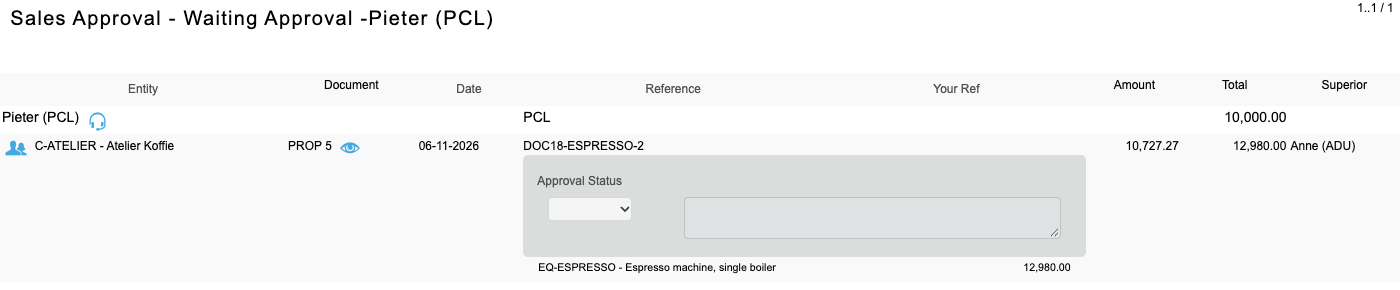
Pieter's own PROP 5 (DOC18-ESPRESSO-2, total 12,980.00) is above his limit of 10,000.00 and waits for Anne.
Both lists are open to every salesperson whose profile has access to Salespersons, not only to managers. Without that access, the two entries are not shown.
The dashboard
The Dashboard has two sales figures:
- To Approve: the total of the customer documents waiting for your approval.
- Waiting Approval: the total of your own customer documents waiting for a superior.
Select a figure to open its list. The totals are kept for the day; Recalculate (the circular arrows at the bottom of the dashboard) updates them.
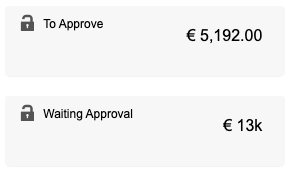
Pieter's dashboard: €5,192.00 to approve (PROP 6), €13k waiting for Anne (PROP 5).