Admin › System Log: what a document import leaves
Availability
Features vary with the edition and configuration you subscribe to: check your licence for the features it includes. Why can't I see a feature?
When documents are imported from a file (Data Import on a documents page, for example Invoicing), Gestix records the import in the System Log, and marks each imported document as imported. This page shows what those records contain, what they do not contain, and how to tell imported documents from documents entered by hand.
This page is for administrators.
What an import adds to the System Log
Import File adds these entries to the System Log, all with the same date and time. Test, which only checks the file, adds nothing.
- One "Documents imported" entry for the run. Its Description gives the series and the kind of documents, the
counts of the run, then "Documents imported":
processed(documents created),existed(documents already in Gestix, left as they were),failed_phase1andfailed_phase2(documents refused). Info shows the kind of documents, for example "Customer Document". - One "Add" entry for each document created. Info shows the document type, for example "Invoice".
- One "Data Import" entry, whose Info names the page the import was run from, for example "Invoicing".
Each entry records the User who ran the import and the Date. The entries do not record the name of the imported file.
Finding an import
- Open Admin › System Log.
- In Section, choose General.
- Set the dates in Between and And. Optional: choose the User who ran the import.
- In Search for, type
Documents imported, then select Apply Filter.
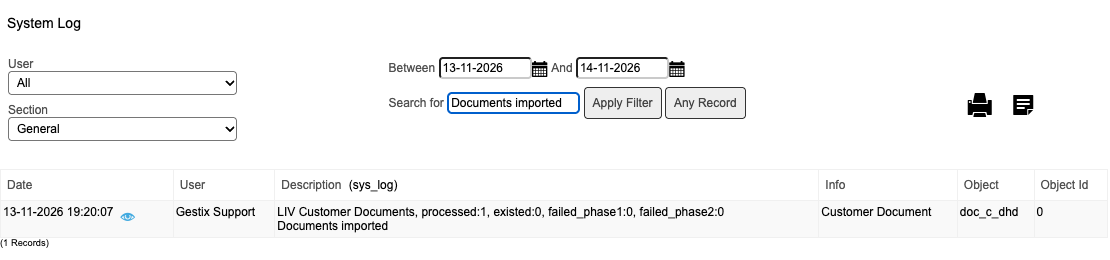
One import run: 1 document processed, none existing, none refused.
To see the documents the run created, clear Search for and select Apply Filter again: the "Add" entries with the same date and time as the "Documents imported" entry are the documents of that run.
An import made through the REST API is recorded in the API log instead: choose API in Section.
Imported documents and documents entered by hand
An imported document shows Imported Yes in the details below the document's notes, with the document ID, series and type. A document entered by hand has no Imported line.
About these screenshots
This example comes from a fictitious tenant in one country. Document names and formats follow that tenant's configuration and tax model; they do not limit how Gestix works in other countries.
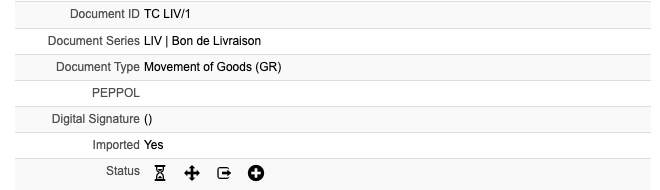
LIV 1, a delivery memo created by the import: Imported Yes.